Vibe Coding This Website with Antigravity

A sunny Sunday
The day was Sunday.
Not any Sunday, but the last Sunday of 2025.
We had a couple come over to help us clean the apartment to prepare it for the New Year New us bonanza.
The cats were running around, the Sun was indeed shining. It was a sunny Sunday!
My Website
I bought andreiilinca.com and andrei-ilinca.com in May 2023 from GoDaddy, thinking I’d eventually turn them into my personal CV and publish insightful, juicy tech articles for the ages—articles that Primeagen would read to his audience and reference forever with Teej during The Standup, like inside jokes.
But I never actually published any articles… Because I suck at writing.
Fast forward to now: AI is here, I have a ton of ideas I want to POC somewhere, and I suddenly remembered that I don’t own one, but two domains that I pay for every year and that serve absolutely no meaningful purpose. Sure, you can subscribe to my newsletter, but unless I’m actually publishing something, there isn’t much value in having it in its current state.
I had the idea in the back of my mind for a while now but didn’t have a concrete plan to do anything with it yet… until today.
I pay for the Ghost Starter plan ($15/month), which I originally chose because it lets me create posts using a nice WYSIWYG editor, has newsletter integration by default, was recommended by Ali Abdaal, offers a solid SaaS experience that’s ready to go in minutes, and—most importantly— it’s written in Javascript.
But when I tried to customize my theme to test out a recent loader game experience I vibe-coded with Antigravity (more on that in a later post), I was told I needed to upgrade to the $29/month Publisher plan just to customize the theme.
So I said: PERFECT. What a great reason to VIBE CODE MY ENTIRE WEBSITE FROM SCRATCH.
A bit extreme but okay ?
So yeah, I launched Antigravity.
First, I looked up how to prevent it from casually leaking my secret keys all over the internet—thanks to a gruesome video I saw a few weeks ago. Added a few files to the deny list. Felt responsible. Then I started hacking.
I told it to analyze the current state of the website. I gave it a long, slightly unhinged prompt about my goals for the new solution. Then I let it rip.
Mainly what I wanted was:
- Control - the ability to code the app exactly how I want
- Speed - a very fast loading experience for posts
- Editor Experience - a clean way to write, edit, and track content
- Easy deployment - auto-deploy on commit to main
- Low Cost - under 150$ a year in maintenance cost, because I’m not a VC-backed startup
What it came up with: Astro, React, TypeScript, and Tailwind on the frontend. Sanity.io as the headless CMS. Vercel for deployment and hosting.
I convinced it to use pnpm instead of npm. I double-checked that the free tiers for Sanity and Vercel were generous enough for my expected traffic (less than 5k visits a month—let’s stay humble). I pushed back a bit on cost control, security guardrails, and vendor lock-in, just to make sure the solution was actually sound.
Then I let it GO TO TOWN.
Was the setup easy ?
Pretty much.
I created accounts on Sanity and Vercel using GitHub. I let Antigravity create the repo. Then I used Vercel’s Astro project setup to import it. I added the Sanity project ID as an environment variable in Vercel and… bada bing, bada boom. New site, live.
I edited this article locally by spinning up the Sanity Admin dashboard using the Sanity CLI. Very professional. Very hacker.
Later edit:
I created a separate folder in the repo for the Sanity Studio UI. It only contains the schema types and the Sanity config. I then added it as a separate project in Vercel and configured the editor.andrei-ilinca.com subdomain for it.
To keep things clean-ish, I added Ignore Build Step rules to both projects. The main website only redeploys if there are changes outside the /studio folder. The editor website does the opposite. Is this the best possible setup? No idea. But I wanted to treat the two projects as separate things, so here we are.
Also, since the website is statically hosted, I used Sanity’s Git hook API to trigger a redeployment of the main site whenever an article is created, updated, or deleted.
What about the details ?
Pareto’s Law, baby.
Getting the first dummy pages up was easy. Dealing with all my nitpicky requirements, however, turned into a late-night activity.
- The theme selector mostly worked out of the box. Mostly. It wasn’t updating text colors at runtime because of a missing Tailwind variable. This required many iterations, a lot of hand-holding, and eventually Gemini 3 Flash figuring it out. Team effort.
- The Sanity project ID was hardcoded instead of being read from environment variables
- Some deprecated APIs were used. Older dependency versions too
- Several UI elements needed extra love. Cursor effects, box shadows, hover highlights, smooth transitions
- Performance wasn’t great but more on that below
- Accessibility also wasn’t great. We’ll call it “aspirational.”
Most of these issues were vibe-fixed with a few prompts and some occasional manual tweaks. Nothing dramatic.
Performance OK ?
Not by default.
I ran Lighthouse on the page you’re reading right now and got… less-than-ideal results. Issues everywhere:
- The main image was render-blocking (even though it was served from the Sanity CDN)
- The critical rendering path was blocked by an unusually large CSS bundle and some very enthusiastic fonts.
- Missing A11y aria-label attributes
- Console errors related to hydration issues
I then told Gemini 3 Flash about these problems, one by one. It applied a few optimizations, which resulted in…
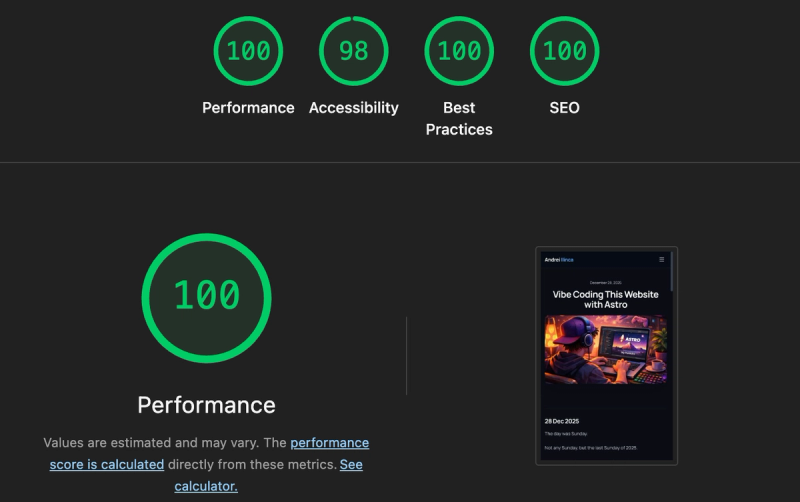
… the desired result.
And yes, of course I did the performance analysis before adding this performance section. And yes, the results are still flawless now. I checked. I’m not a monster.
Later edit:
Lighthouse reports are pretty easy to game, if you know a few tricks about how the metrics are computed. That said, it’s still a solid and easy-to-use tool for quickly checking whether your website is slow or not, especially early on.
Keep in mind that Lighthouse runs everything on your machine. So if you want to know how the site loads in Panama, you’ll definitely need a proper RUM tool.
That’s why I integrated Vercel’s Speed Insights. It gives me real-time performance data, it’s free on the Hobby tier, and everything is green.
All green, baby.
(Granted, I’m the only user… but still.)
Security good ?
We all know that the npm ecosystem is famous for it’s unbreakable security model. Vercel would never ship products with level 9+ security issues. AI Agents definitely don’t leak private keys online or silently install malicious packages into your machine. So yeah, I’m totally safe. Right ?
The truth is, in 2026 it’s very hard to know if anything is 100% secure. Even if you write plain HTML and dump it on a static server, Cloudflare can still have a bad day and your site suddenly disappears.
That said, I did try.
I updated all dependencies and checked pnpm audit for known issues. I used pnpm’s approval system to manually allow which packages can run install and build scripts, to reduce supply-chain risks. I made sure no secrets were committed to the repo.
I told Antigravity not to read .env files. Naturally, it used cat anyway, so I forced it to ask for permission before executing any operation. Progress.
I also made sure the site is fully static, that the Sanity Studio requires authentication, and that allowed domains are configured in Sanity to reduce XSS risks. All executed code is sanitized by default. All assets are served over HTTPS. And yes, I enabled 2FA on every third-party involved.
So… is it secure?
Maybe. Probably.
I guess time will tell.
Pipeline fast ?
Glazing Vercel was not exactly on my bucket list for this project. But credit where it’s due: the commit-to-deploy pipeline is impressively fast. About 17 seconds for the main website and 35 seconds for the editor. And this was basically out-of-the-box when I imported the repo, with only minimal extra config for the editor later.
Vercel automatically detected the right template for each project—Astro and Sanity, respectively—let me inject environment variables, added the domains, and… cha-ching. Sites live.
Build logs are easy to read. A firewall is enabled by default on edge nodes. And so far, agents are allocated to my jobs almost instantly after a push to main. All this, even though I haven’t paid Vercel a dime yet.
What models ?
For the original planning, architecture, and initial scaffolding of the app, I used Gemini 3 Pro (High).
For most of the coding and bug fixing, I switched to Gemini 3 Flash—faster, but still pretty accurate.
Once I hit the limits of both, I tried Gemini 3 Pro (Low) for a short while, until it timed out too. Then I moved on to Claude Sonnet 4.5, which struggled with some basic environment variable issues.
Worth mentioning: I’m seriously considering buying the Google AI Pro subscription. But as of this writing, everything was done using free tiers.
The website logo was generated with GoDaddy’s Airo AI. After it asked for payment, I just took a screenshot, fed it to ChatGPT 5.1, and asked it to replicate the logo in high quality for a favicon. Then I set it in the repo and asked Gemini 3 Flash for the appropriate favicon size. Done and done.
This article’s main image? All ChatGPT 5.1.
Later edit:
I feel like Antigravity is slowly lowering the quotas. After less than three days, all the models were basically “out of batteries.”
I didn’t do any parallel agent work like the overlords suggest these days. Most of my prompts—aside from the original scaffolding—were very specific tasks: bug fixes and incremental improvements to the codebase.
Honestly, I’m a bit disappointed. I was hoping to get more work done, but the quotas had other plans.
How much slop ?
To be honest, less than expected.
Definitely less than what Cursor generated in Auto Mode for a different iOS app I was building as a focus tool—but that’s a story for another post.
The codebase here is tiny and very simple in purpose, so there are fewer opportunities for mess-ups. Plus, the product is generic enough that there are plenty of examples out there to train the AI on.
One example of slop was the Vercel Speed Insights integration. The AI created two components: an Astro one and a React one. The Astro component leveraged the React component, and the React component only enabled tracking when process.env.NODE_ENV === "production" to avoid tracking dev metrics.
Sounds smart at first glance, right? Except the npm package’s README already says it doesn’t track data in development mode. Basically, all that extra stuff could be replaced by just rendering <SpeedInsights/> directly in BaseLayout.astro.
Moral of the story: ALWAYS REVIEW AI-GENERATED CODE.
Overall, I’m pretty happy. Everything was set up fast. And given that I had zero experience with Astro, Vercel, or Sanity, having the site up from scratch—with auto-deployment on commit and 100% performance scores on my first post—in just a few hours is pretty damn awesome.
What about that house cleaning ?
I mentioned it because while Antigravity was doing all the heavy lifting, the couple made the house spotless. I had to pitch in too: hand them things, replace trash bags, recycle plastic bottles, groom one of the cats, order lunch, and handle various other household tasks. Fun Sunday!
So, what’s next ?
By the time you’re reading this, the post should be live on andrei-ilinca.com. If all goes well, there should be a nice welcoming blazingly fast and nicely animated homepage. Possibly also a Projects page with a few things listed and demoed.
Maybe one day I’ll sell something here—a course, a book, or a PDF on how to vibe-code your personal blog in three easy steps. Maybe I’ll even add a “Buy Me a Coffee” link if my content gets so good that strangers feel compelled to fund my caffeine habit. The world is my oyster… and I’m hungry for salty, bivalve molluscs.
Stay around and find out!
Thank you for reading!
Andrei
PS: If you liked the vibe of this post, I wrote an article for Tremend’s Blog a few years ago about keeping up with the JS world, check it out as it’s still relevant today and let me know if you found it useful.